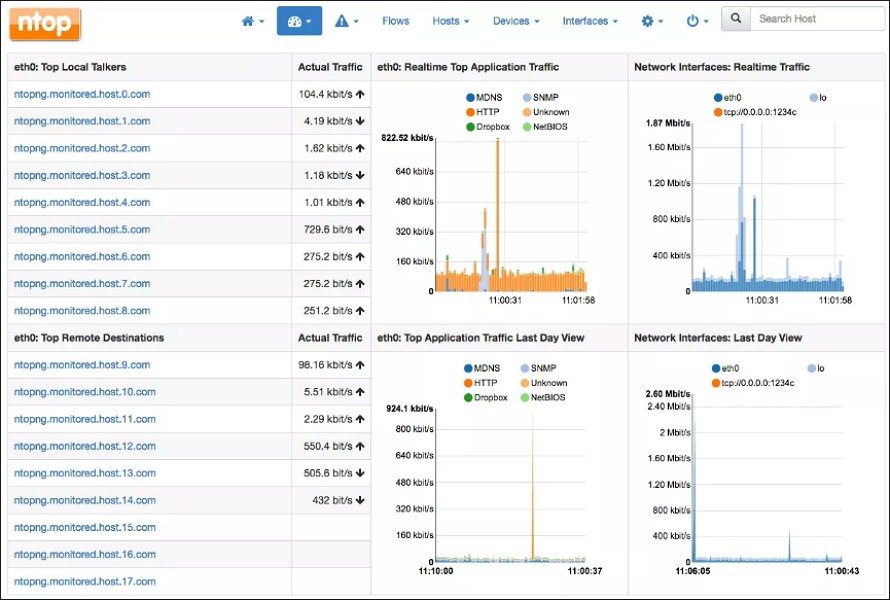
ntopng is not just another packet sniffer. It is a network flow monitoring and analysis tool that gives you a live, visual pulse of your IT infrastructure. Born from the legacy of the original ntop, it has evolved into a centralized hub for administrators, IT students, and security experts who need to understand data flow without getting lost in raw logs. The interface is web-based, intuitive, and runs across multiple platforms. This flexibility has cemented its status as a reference tool for enterprise infrastructures, academic labs, and research environments alike.
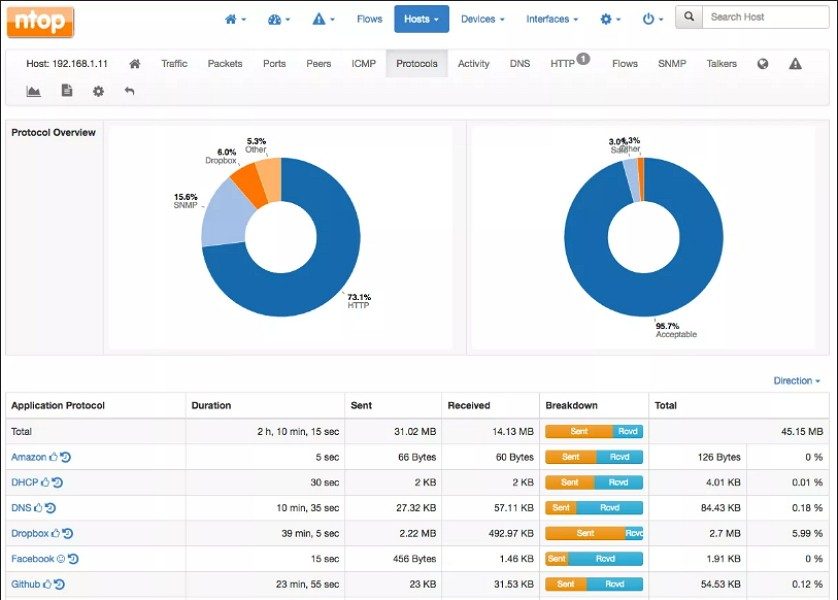
Why does this matter? Because visibility is power. ntopng provides a granular view of data exchanges within a local or wide-area network. It identifies active hosts, quantifies bandwidth consumption, and flags equipment causing performance bottlenecks. More importantly, it detects security anomalies before they become critical issues. Unlike basic packet capture tools such as Wireshark—which are excellent for deep dives but poor at high-level overviews—ntopng aggregates metrics intelligently. It segments traffic by protocol, categorizes flows automatically, and presents these insights through clear, contextual graphics. The result is easier analysis and reporting.
Installation and Platform Compatibility
The core utility of ntopng network monitoring lies in its ability to solve performance and security problems in real time. To get started, you need the official version with up-to-date documentation. Downloading it is straightforward and accessible across major operating systems, which explains its widespread adoption in the IT sector.
You can find direct, secure links on platforms like Futura or the official site. The process involves selecting your target OS and choosing between the free Community Edition or commercial variants.
- Windows: Installation typically uses a guided executable installer. It integrates well with Windows Server environments, making it a solid choice for corporate admins.
- macOS: The software runs with stability and performance parity to its Windows counterpart. It is ideal for users supervising network flows from Apple workstations.
- Linux: This is where ntopng shines for many experts. It supports major distributions including Ubuntu, Debian, CentOS, Fedora, and Red Hat. Installation often involves adding native ntop repositories or using package managers like
apt,yum, ordnf. This ensures optimized operation on high-performance server architectures.
There is no native mobile app for Android or iOS. However, the responsive web interface allows you to consult reports and dashboards via any mobile browser. This is a crucial distinction; you monitor from a phone, but you do not run the engine on it.
Getting Started Without Expertise
You do not need advanced coding skills to install ntopng network monitoring, though basic networking knowledge helps you exploit its full potential. Once installed, access the local web interface via a predefined port (default is usually 3000).
From there, you can:
– Customize settings.
– Select specific network interfaces to monitor.
– Navigate through various dashboards.
The official documentation is regularly updated by both the community and the developers. It includes tutorials, demonstration videos, and installation guides in both French and English. This resource richness lowers the barrier to entry, making the tool viable even for beginners who want to master their network environment. The goal is not just to watch data move, but to control it.
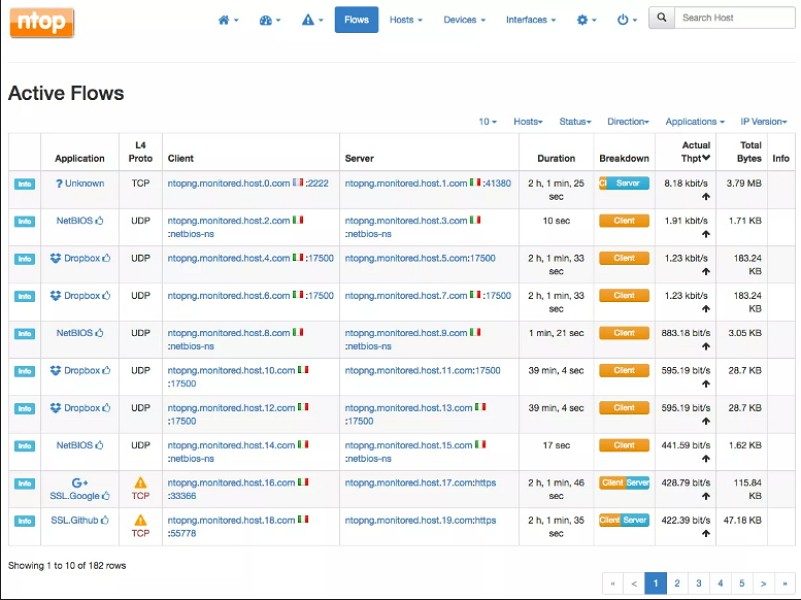
ntopng does not force users into a box. It offers editions suitable for different needs. The community version is free. It has a powerful feature set that can handle basic network monitoring tasks. This version is usually sufficient for home labs, classrooms, and small offices. If you just want to see basic traffic patterns, you don’t need advanced automation or advanced intrusion detection.
But professionals and companies often want more. This is where Professional and Enterprise licenses come into play. These paid tiers unlock certain modules. You get behavioral analysis. You get support for high-volume traffic. You get centralized multi-site management. You also have access to advanced APIs for custom integrations.
Buying a license is very easy. You are dealing directly with the publisher. Pricing is based on the number of flows, the level of technical support and the area of use. Academic institutions and students are not excluded. They often receive special offers such as discounts and the opportunity to access to scaled-down versions for learning purposes.
Stability and update strategy
Transparency is very important to ntopng. Publishers value both update frequency and long-term support. Even if you use the free version, minor updates are offered regularly. You can download it directly from the interface or from the official website. These updates fix common bugs and continuously improve security.
Paid license holders get a smoother experience. Updates are more secure and new features are often announced in advance. Priority technical support is included. If you’re an administrator who wants to take control, you can force updates using the command line or scripts. This ensures that your software stack meets the latest security standards without manual clicks.
Stability is sometimes more important than new features. Maybe you are using an old system. Maybe you can’t afford to change the interface suddenly. This is why ntopng maintains an archive of old versions on its official website. You can download previous versions. This ensures backward compatibility with specific architectures or operating systems. This is a lifesaver for gradual migrations or testing in a development environment.
Learning materials and competitions
Getting good at ntopng is easier than ever. The publisher provides comprehensive documentation. Updated regularly. There are video tutorials. Practical guides. Webinars that cover everything from basic monitoring to advanced operational scenarios.
Some computer science programs are starting to incorporate ntopng into their curriculum. They recognized the ease of use and educational value of this tool. Helps students and teachers understand the basics of flow analysis and network security. The certification modules are also available after the competence assessment. These are highly valued by network supervision professionals.
So how does it compare to other products?
ntopng competes with giants like Wireshark, PRTG Network Monitor and Zabbix. But they have different purposes. Wireshark is the king of deep packet inspection. This is inevitable at the level of forensic analysis. In contrast, ntopng focuses on real-time visualization and flow synthesis. You see the big picture faster.
PRTG and Zabbix offer extensive multi-service monitoring. But their learning curve is steeper. Their interfaces are less focused on pure network analysis. These are universal tools. ntopng is more professional.
Which one you choose depends on your environment. See your team’s skills. Define your goals. If you need to deep packet dives, use Wireshark. If you need extensive infrastructure monitoring, consider PRTG or Zabbix. If you need focused, real-time network visibility, ntopng is the way to go.
The community surrounding ntopng has driven this development. Users share scripts, plugins and extensions in a specialized forums. They exchange experiences. This collective energy combined with regular software updates keeps ntopng up to date. It aligns with market needs and technological innovations in the networking sector.
It’s not just software. This is an ecosystem. And the ecosystem continues to evolve.
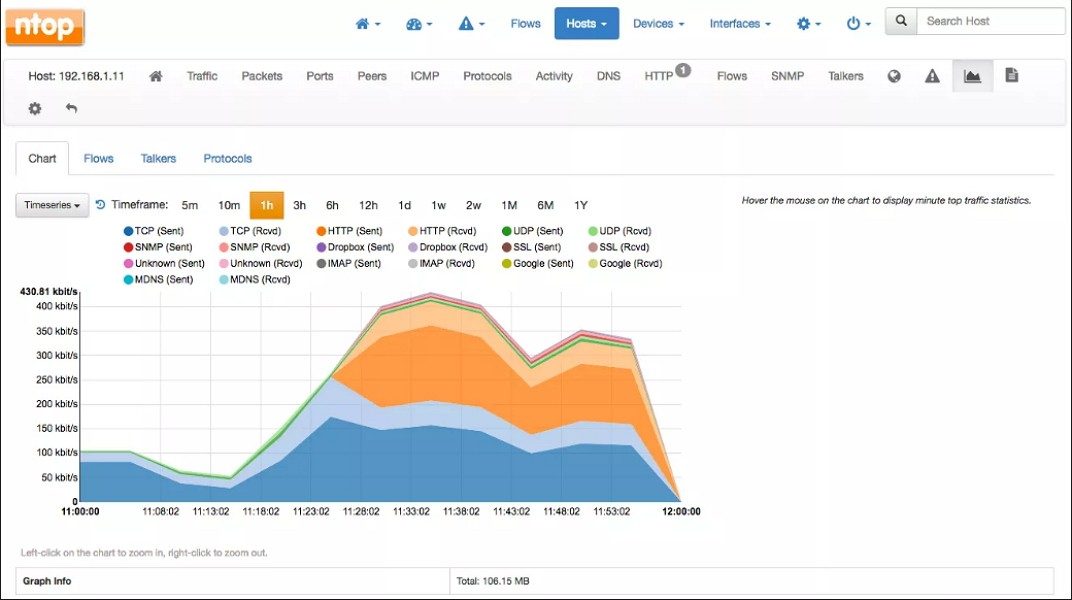
ntopng is more than just a network sniffer. This is a traffic analysis engine located in your browser. No need for clunky desktop clients. Open Chrome, Firefox or Safari. Point it to a local port. You can see the network working in real time.
The architecture is flexible. Works with Windows 10 or 11. Works with macOS. It thrives on Linux and covers all major distributions. If you need ARM 64-bit support, it’s there. x86_64 is standard. Hardware requirements are moderate. It works with standard gear. But don’t underestimate the load. Resource usage depends on two factors: throughput and flow count. More capacity means bigger servers.
How to install ntopng on your OS
Downloading ntopng from Futura is easy if you know what you’re looking for. Check the target operating system. Check the CPU architecture. Make sure the default port is free.
On Windows, run the installer executable. Special packages are available for MacOS. Linux users have more options. Use a package manager or official repository. This will keep your system clean.
After installation, the service starts. The default connection is HTTP on port 3000. It is designed for local use only. You can configure HTTPS later. Just add the certificate. Safety is important.
Protocols and data sources
This engine uses nDPI for application classification. This is its secret weapon. You can sees past the port numbers. Identify if your traffic is YouTube, Zoom or BitTorrent. Handles IPv4 and IPv6. Check layers 2-7.
Where does the information come from?
– Local network interfaces
– SPAN or mirror ports
– TAPs
– Metadata collectors like NetFlow, IPFIX, or sFlow
nProbe may be required for flow-based sources. This is optional but highly recommended for scalability. Without this, you’re simply sniffing packets. With it, you are analyzing flows.
Redis is not negotiable. The engine requires Redis service. It can be local or remote. Do not skip this step. The database stores historical data and time series. Use files or external databases for long-term storage.
Integration and security
You don’t just live inside your dashboard. ntopng speaks REST. The API is based on JSON. You can export data in CSV or JSON format. Alerts can be sent via syslog or webhooks. This allows you to plug it into your existing SIEM or monitoring stack.
Security features include role-based accounts. Passwords are hashed. Authentication integration is edition dependent. There are three tiers.
1. Community : Free. Basically, it’s good.
2. Professional : Business. More features.
3. Enterprise : Enterprise. Comprehensive support and advanced integration.
The user interface is mainly in English. The documentation is available in several languages. This is useful for non-English speaking administrators.
Why this is important for your network
Most tools will tell you “what” is slow. ntopng will tell you why. Identify your application. spots the user. Highlight anomalies.
You can set alerts for a specific activity. You can export compliance reports. Installation is quick. Define monitored interfaces. Set alert thresholds. Start the browser.
Is it perfect? No tool is. But in terms of visibility, nothing beats it. It strikes a good balance between detail and ease of use. You can perform deep packet inspection without using Wireshark for daily monitoring. Perform traffic analysis without the complexity of traditional NetFlow collectors.
The choice of edition depends on your budget and needs. The community edition provides the core engine. The paid edition adds enterprise-grade management. Let’s start with what you need. Expand as needed.
The network is a black box until you open it. ntopng provides a flashlight. It does not fix the problems. But it tells you where to look. In the IT sector, this is already half the battle.
Hardware reality check
You can talk about quantum supremacy until you’re blue in the face. Talk about error correction. Let’s talk about logical qubits. But what about now? We are plagued by noisy intermediate-scale quantum devices (NISQ). The hardware is fragile. Erratic. If you sneeze in the wrong direction, your calculation collapses into static.
This is not science fiction. This is engineering work. And expensive.
Companies like IBM, Google and Rigetti don’t just make processors. They are building cryostats. A giant, room-sized refrigerator that can keep qubits cooler than deep space. Why? Heat is the enemy. Thermal noise destroys coherence. Absolute zero is required if you want the superposition to last longer than 1 nanosecond. Practically speaking. You can’t just plug in a quantum computer. Requires liquid helium. Requires a large power budget. It requires infrastructure that most data centers cannot accommodate.
Where Does This Actually Matter?
So if your hardware has so many flaws, why bother?
Because in “certain” problems, classical computers simply give up. We talk about optimization, simulation and cryptography.
Materials science and chemistry
Let’s look at drug discovery. Designing new molecules is like trying to solve a puzzle with an infinite number of pieces. Classical supercomputers have difficulty solving quantum interactions between electrons. In theory, quantum computers do not. These inherently simulate at the quantum level.
now? We simulate small molecules. Lithium hydride. Probably beryllium hydride. It’s not aspirin. It is not a cure for cancer. But the path is there. This principle holds true. If we can accurately model electron orbitals, we can unlock catalysts for better batteries. Alternatively, you can use nitrogen-fixing fertilizers, which consume less energy. The stakes are high. The timeline is very long. The potential is real.
Optimization Problems
Financial portfolios. logistics chain. traffic flow. These are combinatorial optimization problems. NP hard. Classical algorithms approximate. They get close. That’s enough for now. Quantum annealing – the approach D-Wave uses – tries to find a global minimum in a complex energy landscape. It is not a universal quantum computer. This is a specialized solver. However, in certain logistics problems, it can be better than classical heuristics.
Which one is better? It depends on the problem. If you have routing trucks across Europe, a traditional algorithm with good heuristics might still be faster. If you modeling protein folding, the quantum may eventually win out. But we’re not there yet.
Security Shadow
This keeps CISOs awake at night.
Shor’s algorithm.
In 1994, Peter Shor published a paper that showed that a sufficiently powerful quantum computer could factor large integers exponentially faster than a classical computer. RSA cryptography? It depends on the difficulty of factoring. A quantum computer with thousands of stable, error-corrected qubits could crack RSA. You break Diffie-Hellman. You break the foundation of modern internet security.
Is this imminent? No
Today’s quantum computers have maybe 1,000 physical qubits. You need millions to break RSA-2048. The error rate is too high. The coherence time is too short. But the threat is there. It’s not a matter of if, but.