The MP3 revolution didn’t come from a boardroom. It didn’t start with a slick marketing campaign for a new physical product like the cassette or the CD. It started with us. A massive, noisy crowd of music lovers on the early internet decided they wanted their tunes in a different way. This shift changed how we collect, listen to, and share music forever. The impact is still rippling through the industry today.
Not everyone loved it. Purists hated it. Audio enthusiasts argued that an MP3 file simply couldn’t touch the fidelity of a CD or a vinyl record. They weren’t just hearing loss; they were hearing a compromise. Some even claimed sound engineers started mixing music differently to accommodate the format, often sacrificing nuance for loudness. Was it worth it? For convenience, yes. For pure sound quality? That’s debatable.
If you’ve ever stared at an .mp3 file wondering what’s actually inside, or if you want to know how to get these files onto a CD, you’re in the right place. Let’s break down the mechanics.
Understanding the MP3 File Format
To understand MP3, you have to understand what it isn’t. It isn’t the raw audio data captured by a microphone. It’s a compressed version of that data. The “MPEG-1 Audio Layer III” (that’s the full name, boring as it is) uses a specific type of compression called lossy compression.
Here is the trick. Human ears aren’t perfect. We can’t hear everything. The MP3 algorithm analyzes audio and deletes the parts it thinks you won’t notice. High frequencies that mask lower ones? Gone. Silent spaces between notes? Truncated. The file gets smaller. Much smaller. A CD-quality track might weigh 10MB. An MP3? Maybe 3MB.
This efficiency is why the format took over. It fit on floppy disks. It streamed over dial-up connections. It lived in the chaotic, unregulated wild west of early peer-to-peer networks.
Why does this matter for you? Because every time you stream a song on a low-quality setting, or download a track from a dubious source, you are dealing with this same compression logic. You are trading bits for bandwidth.
The trade-off is real. You lose dynamic range. You lose the “air” around the instruments. But you gain portability. You gain the ability to carry 1,000 songs in your pocket. The MP3 movement proved that convenience often wins against perfection. And once that door opened, it never closed.
Why MP3s Sound Good Enough
If you recall how CDs actually work, you know they pack music into dense, uncompressed digital blocks. We sample audio 44,100 times a second. Each sample takes 16 bits. Stereo means two channels. Do the math and you get 1.4 million bits per second. That is heavy. A three-minute song eats up 32 megabytes. On old dial-up? You waited two hours for one track. Cable modems helped, but it was still slow.
MP3 changed the game. It squeezes that 32-mB monster down to about 3 MB. A 10-to-14x reduction. The sound stays mostly the same. How?
It relies on perceptual noise shaping. This isn’t magic. It’s psychology mixed with physics. The human ear is flawed. We miss certain frequencies. We ignore quiet sounds when a loud one plays nearby. MP3 encoders exploit these blind spots. They delete the audio data you can’t hear anyway. The rest gets compressed using standard algorithms.
You get a “near-CD-quality” file. It’s not identical. Some data is gone forever. But for most listeners, the difference is invisible. Or rather, inaudible.
Understanding MP3 Bit Rates and Quality
Here is the catch. MP3 is a lossy format. To shrink the file, the encoder throws away audio information. Lossless formats keep everything, but they stay huge. Lossy formats sacrifice data for size.
You control the trade-off with the bit rate. This measures how many bits per second are packed into the file. Most encoding software lets you pick.
- 96 to 128 Kbps : Radio quality. Noticeable compression artifacts. Fine for background noise.
- 160 Kbps or higher : The sweet spot. Many sites recommend this for “CD-like” fidelity.
- 320 Kbps : The max for standard MP3s. Audiophiles still argue it falls short of vinyl or CD, but double-blind tests often prove otherwise.
Can you hear the difference between a raw CD and a 320 Kbps MP3? Most people can’t. If you can, you’re likely an outlier.
The debate rages on. Purists hate the format. Casual listeners don’t care. The convenience wins.
This shift reshaped the industry. Buying singles became normal again. After the CD era killed the single, MP3s revived it. Services like Amazon and eMusic let you buy just the track you want.
It also changed how music is made. Engineers say MP3s “flatten” dynamics. The range between the quietest and loudest parts shrinks. Why mix for nuance if the compression will erase it? New music often sounds compressed, loud, and uniform. The dynamic range suffers.
What Does MP3 Actually Stand For?
The name is misleading. It sounds like “music file.” It’s not.
MP3 stands for MPEG audio Layer-3.
MPEG is the Moving Picture Experts Group. These guys built compression standards for video. DVDs, HDTV, satellite TV—they all use MPEG. They needed a way to shrink video files. Sound is part of video. So they created an audio subsystem. Layer-1 was basic. Layer-2 was better. Layer-3, or MP3, was the breakthrough for high-compression audio.
So when you rip a CD, you aren’t just saving music. You’re using a video industry standard to compress sound. It’s a side effect of a larger tech ecosystem.
The Impact on Everyday Listening
MP3 isn’t mystical. It’s a file format. A clever one. It makes moving music easy. Storing thousands of songs on a small hard drive? Possible. Streaming over slow connections? Feasible.
Before MP3, your music library was physical. Now it’s digital. Portable. Instant.
The format democratized distribution. Artists bypassed labels. Listeners bypassed stores. The barrier to entry dropped.
But at what cost? The sonic fidelity. The dynamic range. The intention behind the mix. These things matter to some. To others, having the song is enough.
We live in the age of convenience. MP3 delivered it. Whether that’s a win or a loss depends on what you value more: perfect sound or perfect access.
How MP3s changed the way we hear music
Knowing the history of the MP3 format is fine. Actually using it? That’s where the revolution lived. The MP3 movement wasn’t just a file type. It was the collision of that format with the web’s ability to shout about music and send it everywhere at once.
Three things happened. Fast.
First, distributing music became cheap. Like, nearly free. Second, finding that music got instant. You didn’t wait for a store to open. Third, people learned to mess with sound on their computers. That last one was an accident. It turned out to be the most important part.
The MP3 boom dumped a ton of powerful tools onto desktops. Suddenly, everyone had a reason to figure them out.
You stopped just listening. You started manipulating.
Here is what became possible. And easy.
- Download an MP3 from a website and play it.
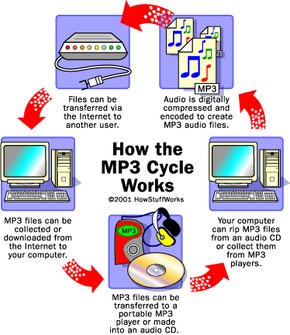
- Rip a CD track. Play it raw or encode it as an MP3.
- Record your own song. Convert it. Share it with the world.
- Turn MP3s back into CD files. Burn your own audio discs from web downloads.
- Rip tracks from multiple CDs. Mix them. Make a custom compilation.
- Pack hundreds of files onto a single data CD.
- Stuff files into tiny portable players. Listen anywhere.
Let’s look at the software that made this happen. And what you can actually do with it.
Downloading and playing MP3 files
Downloading music used to mean buying a physical disc. Now it means clicking a link. The barrier vanished.
You find a site. You click “download.” The file saves to your hard drive. You double-click it. It plays.
This simplicity broke the industry. Not because the tech was complex. Because it was simple.
Software like Winamp or RealPlayer became the default. They handled the decoding. They played the files. They didn’t ask questions.
Why did this matter?
Because access was no longer gated by geography or budget. If you had a connection, you had the music.
The tools didn’t just play files. They managed them. They organized libraries. They created playlists. They turned the computer into a jukebox.
And it worked.
Getting your first MP3 to play
You have a computer. You have speakers. If you are reading this, you have the internet. That is half the battle. The other half is software. You need an MP3 player application. Most modern machines come with one pre-installed. How do you know? Find a song online. Download it. Double-click the file. Does music come out of your speakers? Great. You are done.
Silence? Then you need to install a player. There are dozens of free options. Pick one. It takes ten minutes.
Downloading the file itself is the easy part. Find a site. Click the link. Wait. A typical song is 2 to 4 MB. On older connections this meant waiting 15 minutes. Now it is instant. Once the file is on your hard drive, that double-click test again. If it plays, you have successfully entered the world of digital audio.
Moving music off the computer
Keeping songs on your desktop is fine. But what if you want to listen in the shower? Or on a run? You need a portable MP3 player. These devices are essentially tiny computers dedicated to one task: playing music. They look like cassette players from the 90s but smaller. Much smaller.
The connection method matters. These players plug into your computer via FireWire or USB. A simple software utility manages the transfer. You drag files from your hard drive to the player’s icon. It is that simple. No cables snaking around for hours. Just drag, drop, and walk away.
Ripping CDs and creating MP3s
You have a shelf of CDs. You want them on your phone. You need two things: a ripper and an encoder.
The ripper grabs the data from the CD and puts it on your hard disk. The encoder compresses that raw audio into the MP3 format. Compression is key. It shrinks the file so it fits in your pocket.
Once you have the MP3s, you might want to burn them back to disc. You have two choices.
First, you can burn them as data CDs. This saves the actual MP3 files. The benefit? Space. You can fit dozens of songs on a single disc because the files are small. The downside? You need a computer or a compatible car stereo to play them.
Second, you can convert the MP3s back into full audio tracks and burn an audio CD. Any standard CD player can read this. But here is the catch. You lose the space advantage. An audio CD holds about 70 minutes of music regardless of format. Also, do not expect better quality. Converting an MP3 back to a CD track does not restore the data lost during compression. It just makes the file bigger.
The problem with artifacts
Quality depends on the encoder. Cheap or poorly configured encoders create artifacts. These are glitches in the audio. You hear them as pops, hisses, or strange metallic sounds in the music.
Have you ever listened to a track that sounded like it was underwater? That is likely an artifact. It is not a stylistic choice by the artist. It is a technical failure. The bit rate was too low. The encoder cut out too much data. Listen closely. If the sound is clean, you are good. If it sounds broken, check your settings.
Independent artists and the web
Musicians changed the game. Before the internet, releasing music meant pressing vinyl or CDs. Now? You just need a computer.
Record your song. If it is on a cassette or minidisc, plug it into your sound card’s microphone or line-in jack. Record it digitally. Then encode it to MP3.
Distribution becomes a choice. You can upload to large MP3-distribution sites. They have millions of visitors. You get exposure. You lose control.
Or you build your own website. You keep the control. You have to do the marketing. Some artists use blogs to bridge the gap. Jonathan Coulton used his blog to share life updates and free song samples. His fans came for the jokes. They stayed for the music. It proves you do not need a label to reach people. You just need a file and a link.
Hosting MP3s without breaking your bandwidth
Why host the files yourself when you don’t have to. Offload the heavy lifting to a large web platform. You link to their download area from your band’s site. It’s the best of both worlds. You keep your audience on your turf, but their servers handle the traffic. Those big MP3 files chew up bandwidth fast. Let someone else pay for the pipe.
For deeper dives into the MP3 format and related ecosystems, the next page has links. But there’s a bigger question looming. Do you actually own the rights to distribute this?
Licensing and control in the digital age
Dropping music online is great for promotion. It’s also how you give away your hard work for free. If you want to keep some leverage, look into a Creative Commons license. They’re free. They let you set the rules. You share the work, but you define how others can use it.
MP3 FAQs: What you need to know
What is an MP3 player and what does it do?
An MP3 player is a dedicated electronic device. It plays audio files. The main draw? Portability. You carry it everywhere.
How can I download MP3 songs?
It’s simple. Find the site with the track. Right-click the file link. Select “Save Target As.” Hit “Save.” Wait. Close the window. Done.
Are MP3s free?
The institute that developed and marketed the MP3 format ended its licensing fees in 2017. The format itself is now free to use. That doesn’t mean the music is. Just the container.
Is it worth buying an MP3 player?
Hardly. Modern smartphones do everything. They play your songs, texts, maps, and emails. An MP3 player only plays music. Why buy a single-function device when your pocket already holds a computer?
Where to go from here
The tech has evolved. The formats have shifted. But the core questions remain. How do you share? How do you protect? How do you listen?
Check out these related topics if you’re still digging:
- Can I run my MP3 player on methanol?
- How MP3 Players Work
- MP3 Player Quiz
- How iPods Work
- How iTunes Works
- How Podcasting Works
- How CD Burners Work
- How CDs Work
- How File Compression Works
- How File Sharing Works
- How Sound Cards Work
Useful links:
- Creative Commons
- eMusic
- MP3.com
- MPEG.ORG
Sources:
- Decker, Logan. “Do Higher MP3 Bit Rates Pay Off?” Maximum PC. April 19, 2007.
- Digital Audio Systems. “MP3 Encoding.”
- Fraunhofer IIS. “MP3: MPEG Audio Layer III.”
- Levine, Robert. “The Death of High Fidelity.” Rolling Stone Magazine. Dec. 27, 2007.
- Loukides, Mike. “High Bit Rate MP3s: Are they Necessary?” O’Reilly Media. March 1, 2000.
- MP3-Converter.com. “Bit Rates and Sound Quality.”
- MPEG.org.