Microsoft OneDrive is more than just storage in the cloud. It has solidified its position as a platform preferred by professional teams and individual users. Why? Because it bridges the gap between simple file backup and proactive real-time collaboration. The user interface is very clean. It won’t get in the way. Once you’ve uploaded a document, it’s saved there and can be accessed from all connected devices. Sharing is now as easy as sending a link instead of attaching a file to an email.
Its real power lies in its native integration with the Microsoft ecosystem. If you use Office, OneDrive is under the hood. Multiple people can now edit Word, Excel and PowerPoint files at the same time. No more emailing “Final_v2_REALLYFinal.docx” back and forth. Changes are synchronized immediately. The version history remains unchanged. Updates are centralized, eliminating the clutter of scattered copies. In addition to basic storage, OneDrive offers advanced search features and a folder structure to organize data and speed up searches, not treasure hunts.
For many users, data security is the highlight of the cloud. Thanks to automatic backups, your data is preserved even if your hard drive is damaged. Was it accidentally deleted? OneDrive reserves recovery windows for such moments. Microsoft uses encryption to protect data stored on its servers and addresses privacy concerns directly. It’s not just storage. It’s a productivity tool designed to give you peace of mind.
Cross-platform usability and installation
One of the strongest arguments for using Microsoft OneDrive is its ubiquity. This service is designed to track you no matter what device you have.
Where can I get it?
The official client can be downloaded directly from the Microsoft website. But for most Windows users, it’s already waiting. OneDrive is built into Windows 10 and Windows 11. Even if you have an older system such as Windows 7 or Windows 8.1, you can install a separate application. Mac users are not excluded either. There is a version optimized for macOS that follows the latest iteration of the operating system. Mobile users can get the app for free on Android and iOS, so your files are always at your fingertips even when you close your laptop.
Seamless synchronization between devices
Magic happens in sync. Whether you use a desktop computer, tablet or smartphone, the status of your files is the same everywhere. Start a document on your phone while commuting and finish it on your PC at the desk. The web interface also plays an important role here. It can be accessed from any browser and can be used as a backup or primary tool if you’re using someone else’s computer or Linux box.
Installation and maintenance
Installation is very easy. Download the app, sign in with your Microsoft account (personal or work/school) and run it. The synchronization process will start automatically. If you need to downgrade for compatibility with older software, you can find repositories online, but this is rare for the average user. What is the better approach? Keep your software up to date. Microsoft updates regularly to maintain security and efficiency. When you set up automatic updates, you almost never have to think about background maintenance again.
OneDrive takes the hassle out of file management by updating and synchronizing changes between all your devices in real time.
The question is: does it fit your workflow? For those who have invested in Microsoft Office, the answer is usually “yes”. The integration is too tight to ignore. For other businesses, the free tier provides an attractive entry point for cloud-based organizations with paid plans that can scale for large storage needs and advanced management.
It’s not without its quirks. Accidental offline editing can also cause sync conflicts. The mobile app is fully functional but can feel heavier than native iOS or Android file managers. But it’s also up against its competitors thanks to its balance of accessibility, security, and collaboration features.
As your digital footprint grows, the need for a reliable, centralized repository ceases to be a luxury and becomes a necessity. OneDrive provides this infrastructure. Whether you want to back up family photos or collaborate on quarterly reports, this platform can handle the heavy lifting. The user interface is unobtrusive. Sync works. Usually this is enough for now.
Cloud storage environments are full. But Microsoft’s strategy of building OneDrive deep into its operating system has created a sticky ecosystem. You don’t just use OneDrive; you live in it. For better or worse.
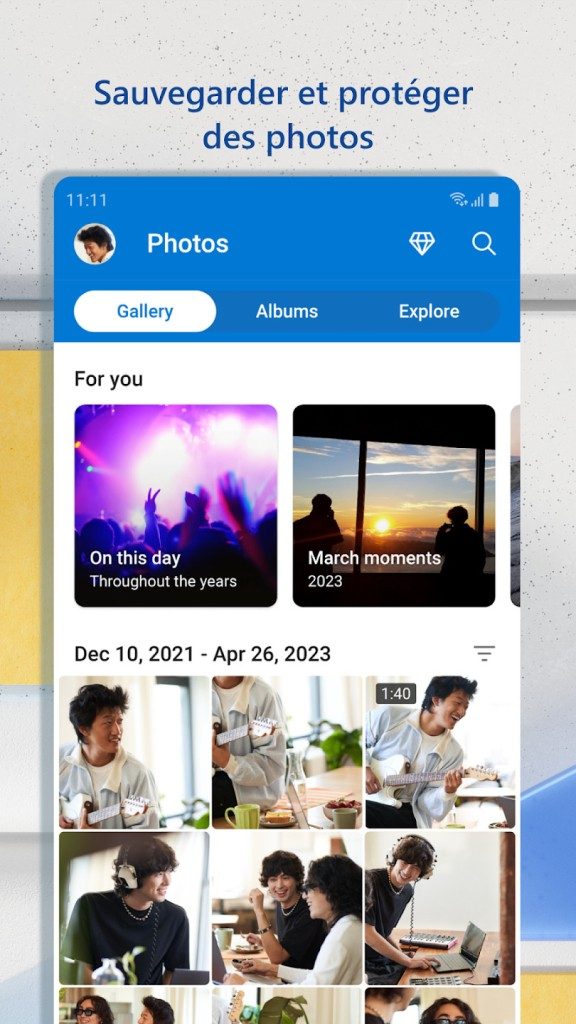

It makes sense to start with the basics. Get 5GB for free. Not a huge amount by today’s standards, but enough to store a resume, a few photos, and basic documents. This is an entry point for students or those just testing the waters. No credit card required. It’s just a Microsoft account.
But 5 GB fills up fast.
This is where the paid level comes into play. Microsoft has divided its products according to different wallets and needs. Individual users can choose from packages such as OneDrive Standalone, Microsoft 365 Personal and Family. The Family plan is interesting. Offers 1 TB of space per person for up to 6 people. Turn OneDrive from a simple backup drive into a shared home hub.
Why upgrade? Security and collaboration
Why pay?
The improvement in storage space is obvious. But the real value is in what comes with the subscription. You get 30-day version history. Did you accidentally delete a file? You can take it back. But this is just a safety net.
For Microsoft 365 subscribers, OneDrive is the brain of your operations. Tightly integrated with Office applications. Edit Word documents, Excel spreadsheets and PowerPoint slides right in your browser. No software installation required. This is real-time collaboration. Multiple people can work on the same file without merging conflicts later.
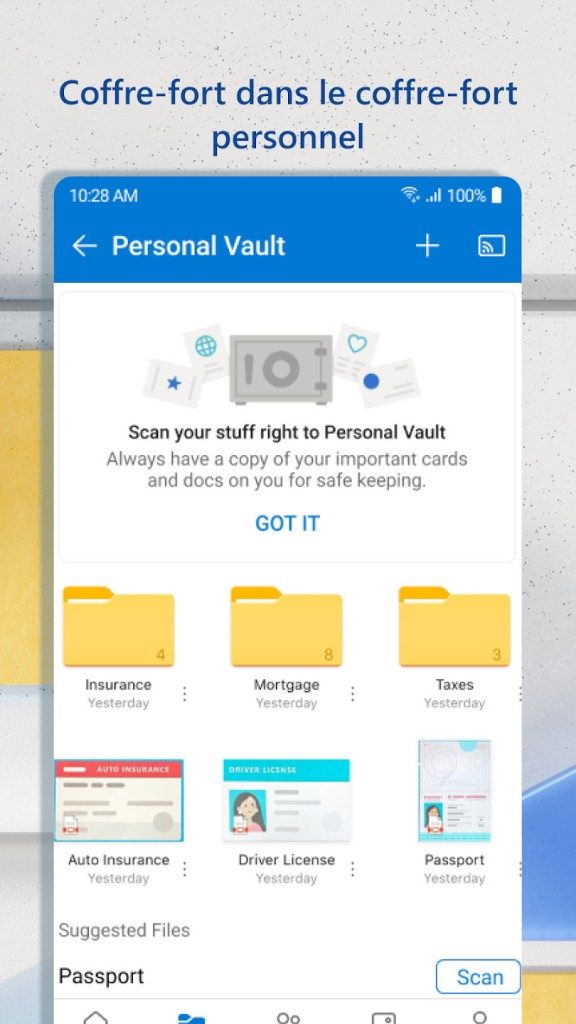
Then there is security. Paid plans offer ransomware detection and recovery. If your files are encrypted by malware, OneDrive can restore them. There is also a Personal Vault. This is a separate, highly secure folder for storing sensitive information such as tax returns and ID scans. Additional authentication is required to open. Biometrics, or a code sent to your phone. It adds to the paranoia that may be necessary.
Education and enterprise
Students and schools are treated differently. Educational institutions usually offer large storage space for free. Why? Because you need to submit assignments, share research and collaborate on projects. These tools are tailored for academic use.
Businesses have their own track. Microsoft 365 Business plans give you more control. Administrators can manage permissions, enforce security policies, and integrate with other enterprise tools. Microsoft also offers training and certifications for IT professionals who need to master these complex environments. It’s more than just storage. This is infrastructure.
OneDrive vs. Google Drive, Dropbox, and iCloud
The market is crowded. Google Drive, Dropbox, Box, iCloud are all competing for the same bytes.
The biggest advantage of OneDrive is integration. If you’re using Windows, it’s already there. It feels native. Synchronization is seamless. Drag the file to your OneDrive folder and it is everywhere. iCloud works great on Apple devices, but it locks you out if you switch to Android or Windows. Although Google Drive is cross-platform, it feels more like a separate application than an integrated part of the operating system.
Dropbox is still fast and reliable for file syncing. However, it lacks the deep office integration offered by Microsoft. Box is focused on enterprise content management. It’s not about personal storage, it’s about business workflow.
Upgrades and compatibility
Microsoft updates OneDrive frequently. Performance improvements, security patches and new features are released regularly. You don’t have to do much. The application updates in the background. If something breaks, you can force the update through the settings or download the latest version manually.
Compatibility is another strength. It runs on Windows 7, even though Microsoft has ended support for that OS. Works smoothly on macOS, iOS and Android operating systems. This is important for companies that cannot upgrade all their machines immediately. Allows for a gradual transition.
Is this the perfect solution? Probably not. But it is a universal and evolving tool. It centralizes your data. Protect your work. For most, this is enough.
The question is not whether you need cloud storage. The best cloud for your workflow is: OneDrive fits perfectly into the Microsoft ecosystem. The others fit their own. Choose carefully.

Checking the technical requirements before exploring Microsoft OneDrive is more than just a formality. Here’s how to make sure the sync process doesn’t block your device, plan how much storage you really need, and understand how collaboration tools work. This cloud storage service isn’t just sitting around. Directly integrated with Windows File Explorer and macOS Finder. You can also use it with any modern browser without installing any add-ons.
Your data moves securely. Files are encrypted when stored on Microsoft’s infrastructure. Select sync and Files on Demand features help keep your local footprint small. Sharing links, version history and recovery tools facilitate collaboration. OneDrive is deeply integrated into the Microsoft 365 ecosystem. This means that Office document co-editing and integration with Teams, Outlook and SharePoint are virtually invisible. In professional environments, management takes place via Microsoft 365 and Intune. Data security and administration policies are adjusted according to the subscription level.
Here’s a breakdown of what you get when you download Microsoft OneDrive.
Core Specifications and Licenses
This software is published by Microsoft. This falls into the Bureautique, internet, and productivity categories. This is a freemium model. You can get a free Microsoft account with limited storage or upgrade to Microsoft 365 for more storage and premium features. The application type is simple: cloud storage and synchronization services.
Depending on the platform, it supports multiple architectures such as x86, x64 and ARM. Distribution is flexible. Desktop installers for Windows and macOS are available from the Microsoft Store, Apple App Store, and Google Play. The web interface is always available.
Platform support and requirements
OneDrive is available for Windows 7, 8, 8.1, 10 and 11. It also supports macOS, Android and iOS/iPadOS. Synchronization and sharing requires a constant Internet connection. However, cached files allow offline access. You still need a Microsoft account (personal or professional) to sign in.
Supported browsers include the latest versions of Edge, Chrome, Firefox and Safari. It can handle any type of file thrown at it. Previews are available for common formats such as Office documents, PDF files, images, and video files. Data hosting is based on Microsoft’s cloud infrastructure. Data storage options may vary depending on offers and company policies.
Security, Management, Features
Safety is our number one priority. Data is encrypted in transit and at rest using TLS. Multi-factor authentication adds an extra layer of protection. Key features include selective sync, which lets you choose which folders stay on your device. Files on Demand allows you to view files without downloading them. When you share a link, you can control access rights. Version history lets you go back in time if you make a mistake.
Integration is tight. Works with Microsoft 365 apps like Word, Excel, and PowerPoint. Connect to Outlook, Teams and SharePoint. System administrators are managed through the Microsoft 365 admin center and Intune. Data security and compliance policies adjust based on your subscription tier. The user interface is multilingual, including French.
Why this information is important for everyday users
If you have an older machine, it’s helpful to know the architecture. Support for Windows 7 means that old systems are not completely left behind, despite the increased security risks. ARM support is important for new Windows on ARM devices, ensuring native performance without emulation lag.
Freemium models can be a trap if you don’t read the fine print. Free accounts have limited storage space. Upgrading to Microsoft 365 gives you more space, but requires recurring payments. Offline access is a salvation for travelers, but only if you mark the files as “Save to this device”. Otherwise, Files on Demand displays a placeholder that cannot be opened without a connection.
Encryption at rest protects against physical theft of servers from physical theft. Encryption during transfer prevents network eavesdropping. Multi-factor authentication prevents most account takeovers. These are not just buzzwords. These are the differences between a hacked account and a protected account.
Integration with Teams and Outlook will change the way you work. Share a link instead of attaching a file to an email. This will keep your email clean. It also ensures that everyone is running the latest version. Joint editing of Word or Excel takes place in real time. Changes appear instantly for all collaborators. This will reduce the clutter in the “final_final_v2.docx” file.
Management through Intune allows IT departments to enforce policies. External sharing can be restricted

It felt like I was back at the starting line. Again. The hype cycle doesn’t just rotate; it spins in place until you feel dizzy. We’ve been shouting about AI for a few years now. Now we are pivoting. Hard. Currently, our focus is not only on creating text and images. This is about infrastructure. It’s about what happens when your model is too big to handle alone in the cloud.
Edge computing is no longer a buzzword for system administrators. This is a survival strategy.
Why the cloud can’t handle everything
Let’s be honest. The cloud is fantastic for storage. decent for batch processing. If the delay is measured in milliseconds, this is not suitable for real-time decision making.
Self-driving cars can’t send visual data to a data center in Virginia and come back before it’s too late to swerve. Physics won’t allow it. Distance is the enemy.
This is where change happens. Processing is closer to the source. Your phone. your router. your smart fridge. Even your car’s onboard computer. It’s not just about speed. This is about privacy. This is related to bandwidth costs. It’s about reliability in the event that the network cable is disconnected.
Hardware bottleneck
This is the ugly truth that no one wants to admit. The software is ready. The model is optimized. Hardware? It’s struggling.
GPUs are expensive. They consume massive amounts of power. The generated heat requires industrial cooling solutions. It is not enough to just install a GPU in every IoT device. The form factor does not allow this. The electricity budget does not allow it.
So what could be the solution? Specialized chips. NPU (Neural Processing Units). TPU. These are not general purpose processors. They are designed for one thing: matrix multiplication. The mathematics behind AI.
“Efficiency is no longer a feature, it’s a product.”
Companies are racing to get these small, efficient cores into everyday devices. Not just high-end phones. A mid-range laptop. Budget tablets. Even wearables. The goal is to run inference locally. No need to ask the cloud for permission.
Design by Privacy
There is also a political dimension here. GDPR. CCPA. Regulations are being tightened. Users are paranoid. Rightfully so.
When you send audio data to a server, someone owns the recording. For some time. for a specific purpose. It’s a liability.
On-device processing changes the contract. Your voice stays on your device. The model learns from it, updates its weights and forgets the input. At least that’s how it should be. It’s cleaner. Quieter. Less exposed to data breaches.
This is why manufacturers tout “on-device AI” as a selling point. It’s not just about performance. This is trust.
Battery Trade-off
It’s not all sunshine and local inference. Local processing of data drains batteries. Quickly.
Smartphones that do a lot of AI work die in half the time. This is a real limitation. Engineers walk a tightrope between performance and endurance.
Some solutions include a hybrid approach. Light tasks on your device. Heavy lifting offloaded when charging. Or when connected to a Wi-Fi network. But the ideal is complete autonomy. Offline capability. This is the holy grail.
What does this mean for you?
You don’t need to know what NPU is