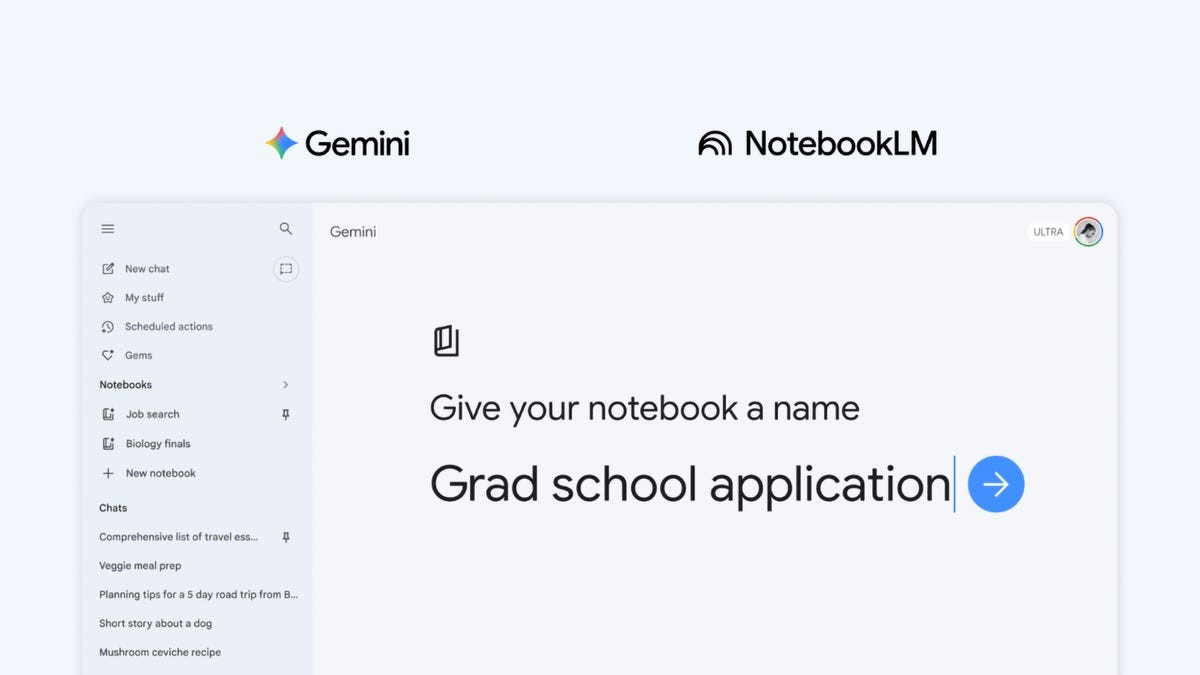
Google is deepening the connection between its flagship AI, Gemini, and its specialized research tool, NotebookLM. Through a new Notebooks feature, users can now create and manage personal knowledge bases directly within Gemini that stay perfectly synchronized with NotebookLM.
Bridging the Gap Between Chatbots and Research Tools
To understand why this update matters, it is important to distinguish between the two tools:
- Gemini acts as a general-purpose AI assistant. It is designed to be expansive, pulling information from across the entire internet to answer questions and complete tasks.
- NotebookLM acts as a specialized research assistant. Unlike Gemini, it is “grounded” in specific sources provided by the user—such as PDFs, documents, or meeting notes. This prevents the AI from wandering off-topic and ensures its answers are strictly based on the data you have uploaded.
By integrating these two, Google is essentially allowing users to combine the broad intelligence of a chatbot with the deep, focused accuracy of a research tool.
How the New Syncing Feature Works
Previously, users could pull NotebookLM data into Gemini to provide context. Now, the workflow is becoming bidirectional and more seamless.
With the new update, you can create a notebook directly within the Gemini interface. This notebook serves as a centralized knowledge base where you can store files, past chat histories, and specific documents related to a single subject.
The key advantage is instant synchronization :
1. Create in Gemini: You can organize your thoughts and upload documents while chatting with Gemini.
2. Analyze in NotebookLM: Because the notebooks are synced, those same files and conversations are immediately available in NotebookLM.
3. Generate Advanced Outputs: Once your data is in NotebookLM, you can use its specialized features to transform your research into Video Overviews, infographics, or structured summaries.
This eliminates the need to manually re-upload files or re-explain context every time you switch between a general chat and a deep-dive research session.
Availability and Rollout
Google is introducing a dedicated Notebooks section in the Gemini side menu to make managing these projects easy. The rollout will follow this schedule:
- Immediate Access: Users on Gemini AI Ultra, Pro, and Plus plans on the web.
- Coming Soon: Expansion to mobile devices, additional countries across Europe, and access for free users is expected in the following weeks.
This integration marks a shift from treating AI as a simple “question-and-answer” engine toward treating it as a structured, long-term collaborator capable of managing complex, multi-document projects.
In short, Google is turning Gemini into a central hub for organized information, allowing users to move fluidly between casual brainstorming and rigorous, source-based research.