ESET is a household name in cybersecurity. We know the names. The software works. But even the best resident antivirus can miss something. That is where ESET Online Scanner steps in. It is not a replacement. It is a backup. A safety net.
Think of it as a second pair of eyes on your Windows PC. You run it when you suspect something is wrong. You run it to verify your current protection isn’t sleeping at the wheel. It catches the stray trojans, the hidden ransomware, or the weird behavior that your main shield ignored.
Why You Need a Second Opinion Tool
Most of us have one antivirus running. Maybe Microsoft Defender. Maybe Bitdefender. Maybe Norton. They are good. They stay in the background. They consume resources. They occasionally slip up.
The ESET tool offers a “second opinion.” This is a standard term in IT security. It means using a different engine to check the same system. If your primary antivirus says you are clean, but this tool finds malware, you have a problem. If both agree, you breathe easier.
It uses ESET’s signature database. It also uses heuristic analysis. This means it looks at behavior. Not just known file hashes. It watches for suspicious actions. Unknown threats? It can flag those too.
No account needed. No subscription. No registration form. You download. You scan. You act. This speed matters when a system is compromised. Every minute counts.
How ESET Online Scanner Works
You do not install it like a traditional program. It is a portable tool. You launch it from a browser or a small executable. It sets up quickly. It tears down quickly.
Once started, you choose your scan type. A quick scan. A targeted scan of specific folders. A full system sweep. The interface is clean. Minimalist. It guides you step-by-step. Even if you are not tech-savvy, you can follow along.
The tool runs independently. It does not conflict with your resident antivirus. This is critical. Running two resident antivirus programs simultaneously is a recipe for disaster. They fight over system resources. They block each other. They slow your PC to a crawl.
This tool avoids that pitfall. It is on-demand. It uses minimal resources while it works. After the scan finishes, you delete the tool. No leftovers. No background services. No performance hit. It leaves no trace.
Compatibility and Limitations
This tool is Windows-only. If you are on macOS, Linux, Android, or iOS, this is not for you. ESET does not provide a native version for those platforms. You would need to look at their other products or competitors.
Supported Windows versions include:
– Windows 7
– Windows 8
– Windows 8.1
– Windows 10
– Windows 11
It covers a wide range. Even older hardware can run it. The download comes from the official ESET site or trusted tech portals. You get the latest, safest version automatically.
When to Use It
You use it when you are suspicious. A weird popup. Slow performance. Unknown processes in Task Manager. Your main antivirus is silent. But something feels off.
Run this scan. Let it dig deep. It might find nothing. That is good. If it finds threats, you have confirmation. You have a path to removal.
It is a diagnostic tool. Not a cure-all. But it is a powerful one. It bridges the gap between “I think I’m safe” and “I know I’m safe.”
Getting Started
Go to the official ESET website. Download the executable. Double-click. Follow the prompts. Choose your scan depth. Wait for the results.
The process takes minutes. Or hours, if you do a full scan of a large drive. Be patient. Let it finish. Do not interrupt it.
Once done, review the findings. Remove what it finds. Then close the tool. Delete the file. Your system is back to normal. No bloatware. No lingering security processes.
The Bottom Line
Antivirus software is essential. But no single solution is perfect. Threats evolve. Vectors change. A second opinion is not paranoia. It is prudence.
ESET Online Scanner provides that prudence. Free. Fast. Effective. For Windows users, it is a simple, reliable way to verify their digital health.
Is your current antivirus enough? Or do you need to check? The answer depends on your risk tolerance. For most, a periodic scan with this tool is wise. It costs nothing but time. It saves you from regret.
The digital landscape is noisy. Threats hide in plain sight. Tools like this help you see them. Use it. Then sleep better.
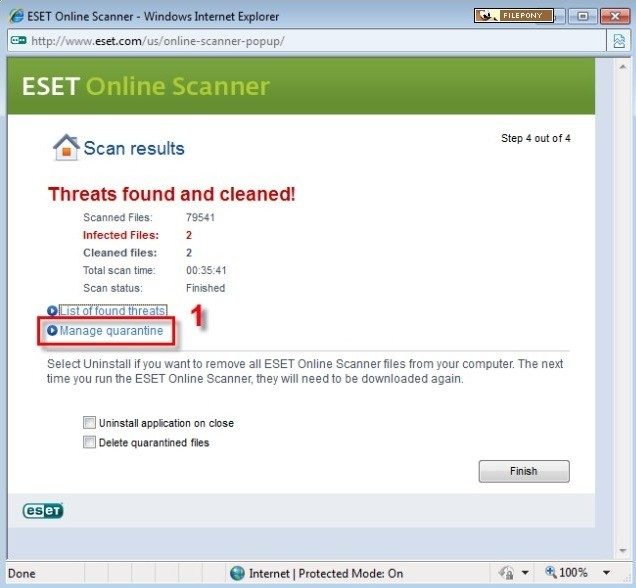

Comparison of ESET Online Scanner and other on-demand tools
ESET Online Scanner has a certain niche in the on-demand scanning market. It has a good balance between detection accuracy and portability. Unlike regular antivirus software, it doesn’t monitor your system in real-time, but only works when needed. Ideal for secondary inspections and investigations of suspected infections.
Microsoft Defender Offline and Malwarebytes AdwCleaner are popular options. ESET Online Scanner includes the comprehensive threat identification expertise of ESET Labs. This means it is better able to handle the latest threats and suspicious files. Other tools usually require a full installation, and some require booting into safe mode. ESET Online Scanner works directly in your active Windows environment without interruption.
Users often confuse this tool with ESET NOD32 Antivirus or ESET Internet Security. The difference is obvious. Online scanners are used for spot tests. Other products offer continuous protection. These features include, for example, parental controls, network monitoring and anti-phishing. ESET Online Scanner is still completely free. Paid packages require a license after the trial period. No registration required. No license key is required. If you just want to check the health of your system without the cost or logistics, this is a smart choice.
More information about updates and version control
The strength of this tool is its update mechanism. The latest threat definitions are used. This allows the virus to automatically download based on the latest information when the application program is launched. If an update is required, you can simply restart the application program or download the program again from official sources.
ESET Online Scanner has no specific licensing fees. Free for all Windows users. This forms a clear contrast compared to other ESET solutions.
You may be wondering which version is best. Use the latest version. It includes relevant security features and new detection features.
Training and Certification Resources
Is there a certificate for this tool? No. There is no official training program for ESET Online Scanner. This tool is simple and designed for ordinary users. If you are interested in broader cybersecurity and ESET’s professional services, the company offers webinars and training resources. System administrators and security professionals can explore certification paths for enterprise solutions.
ESET Online Scanner is one of the most reliable and easy-to-use on-demand scans for detecting Windows threats. This reflects ESET’s expertise and does not require technical skills. it works. That’s often enough.
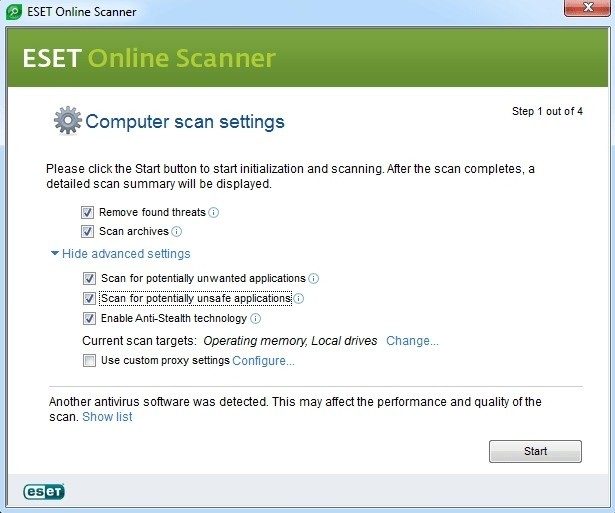

ESET Online Scanner technical data and system requirements
A special safety kit is not required for one-time cleaning. ESET Online Scanner fills The gap. Works on demand. There are no background services. No real-time blocking. A lightweight executable file that, when started, retrieves new threat definitions from ESET Cloud. This design offers a small footprint. When the scan is complete, you can delete the temporary files and exit.
This software works well with your local antivirus product. No permanent drivers or services are installed. Conflicts are rare. Administrator privileges are still required to remove deeply embedded malware. You can use standard Windows accounts for scanning. But fixing the mess requires elevation.
Compatibility covers the entire Windows spectrum. Windows 11, Windows 10, Windows 8.1. Windows 7 also supports both 32-bit and 64-bit architectures. No fancy hardware required. A normal PC works fine. The only mandatory requirement is an Internet connection. Required to download the launcher. Required to obtain the latest signature. May be required for cloud-based analytical checks.
The user interface is very simple. A guided wizard lets you pick your poison. A quick scan for a cursory inspection. Targeted scan for a specific folder. If you suspect a deep infection, Full scan if you suspect a deep infection. This tool generates detailed reports. You can view every checked and cleared item.
“Focuses on on-demand identification and removal, acting as a supplement to investigations rather than primary protection.”
Why The scanner is important for everyday users
Most people use antivirus software 24 hours a day, seven days a week. Sometimes that’s enough. In some cases, primary protection may lack something. Or maybe you downloaded a questionable tool and want to get a second opinion. That’s where The free tool comes in handy. This tool uses ESET’s detection engine at no additional cost.
The update process is automatic. No need to download manually. There are no configuration files. Click on the executable file. It grabs what you need. It scans. It reports. Simplicity is the key. Remove barriers to entry. You don’t need to know about registry keys or service dependencies. You just need to know how to double click the installer.
For administrators, it provides a non-intrusive way to check endpoints. For home users, it is a sanity check. The multilingual interface supports French, English, etc. It doesn’t matter where you are. Logic is universal. Find threats, remove threats and document results.
How to use ESET Online Scanner safely
Start with an administrator account. This ensures that the tool can access protected areas of your system. Connect to a stable network. If the download stops, the check will fail before starting. Open the executable file. Accept the license agreement. Select the scan type.
A quick scan checks memory and startup items. A comprehensive scan digs deep into all your files. Targeted scanning allows the laser to be aimed at specific drives or folders. Use The feature if you know where the malware landed. The tool processes items in real-time. You can see the progress bar moving. Flag suspicious files. Suggest to remove or quarantine them.
When the scan is complete, you will see a summary in the user interface. Logs can be exported. Close the application. Delete the temporary files it created. The work is done. No trace was left. There are no scheduled tasks in the background.
This method works because it is temporary. It does not conflict with major antivirus software. It does not slow down your boot time. It simply provides a snapshot of the state of the system at a given time. If you find any threats, you can run your main antivirus software again to ensure nothing was missed. As long as your system is clean, you can use it with confidence.
This tool is free software. No trials. There is no premium upsell. It’s just a standalone scanner. Suitable for workflows that values precision over persistence. You call it in when you suspect trouble. It does its job. It leaves. That is the entire lifecycle.
You may be wondering if one scan of an infected computer is enough. Usually yes. However, if the infection persists, you may need to restart in safe mode. Or use a bootable rescue disk. The